‘Rolls Royce of Smartphones’: The World’s Most Secure Smartphone is Also the Most Expensive

Dubbed as the ‘Rolls Royce of Smartphones’, Sirin Labs, an Israeli startup has come up with the most expensive smartphone priced at $14,000 (over Rs. 9 lakh). Interestingly, if you are looking for a completely private and secure conversation this is your phone.

The-Worlds-Most-Expensive-Smartphone-for-14000-Over-Rs-9-lakh

It offers military-grade security with hardware based end-to-end 256-bit AES encryption. Your calls and messages will be secured over a FIPS 140-2 certified network, ensuring a complete private communication accessible to intended participants only. You can turn on a completely isolated environment at a flick of a switch located at the back. All calls and messages will be encrypted after it is turned on.

Appearance? The phone sports a 5.5 inch curved Corning Gorilla Glass 4 screen with 16 LEDs backlight to ensure minimum color blending and presenting individual colors in their most distinct form. The Solarin has a 8MP front-facing camera with a dedicated flash. The rear camera is massive 24MP shooter with a four-tone flash module, laser autofocus and f/2.0 aperture lens.

ceaqprqklq-1464759844

Solarin has 3 high-fidelity loudspeakers with 90dB loudness and stereo sound and four surrounding microphones. It also supports Qualcomm aptX quality encoded audio support.

The phone comes with the most cutting-edge of cellular and wireless technology. It supports 24 bands of LTE, high-speed 802.11ac 2×2 MU-MIMO Wi-Fi and WiGI. With all this combined, the phone boasts a downlink of 450Mbps and uplink 150Mbps.

Solarin is powered by Snapdragon 810 Octa-Core 64-bit processor clocked at 2Ghz coupled with Adreno 430 GPU and 4GB of LDDR4 RAM. It also comes with 128GB of internal storage with no option to expand it. It runs on a heavily skinned Android 5.1 Lollipop OS with the latest security patches right upto the month of May.

sirin-labs-solarin-0001-1500x1000

With a 4,000mAh battery with a standby time of over 2 weeks and talk time of up to 31 hours, the Solarin is not a sleek smartphone by any means. It measures a hefty 250 grams and is 11.1 mm thick. The back panel is made of exclusive Italian leather and is available in four colour variants. It features Qualcomm Quick Charge 2.0.

As a technology lover you may like our daily important technology news series. It’s a playlist and you can retrieve the total day-wise videos. Please consider subscribing our YouTube channel:

Author: Technology Vista
Tagged : /

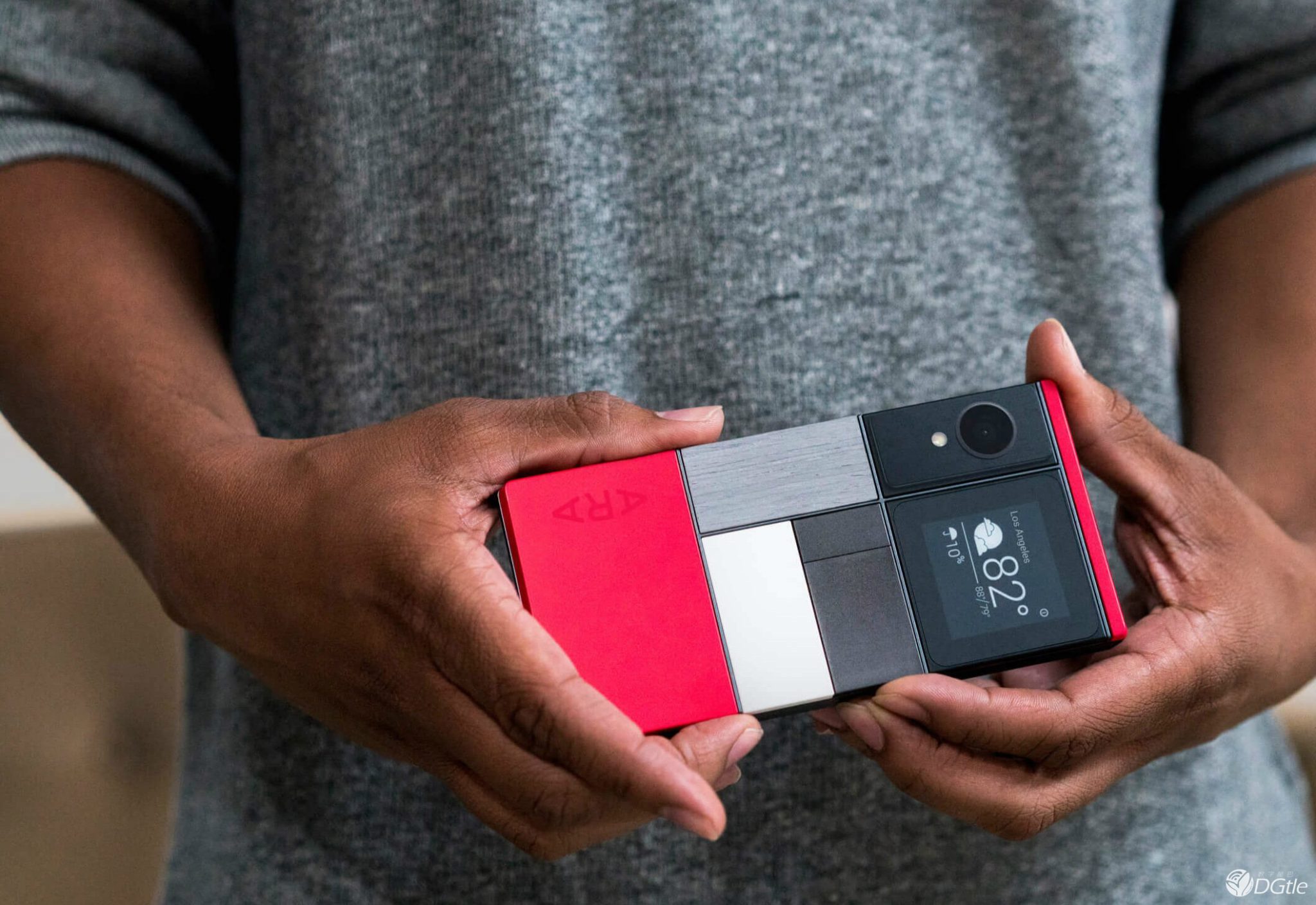
Infinite upgrading of Smartphone components? Why Google’s Ara Modular Phone is a game changer

Moonshot modular phone project named Ara is one of the latest and biggest innovations of Google.

The phone is flexible, which means each part can easily be swapped out and replaced, consequently increasing the life of a smartphone beyond the typical two years. Suppose you don’t like the camera on your phone anymore, you don’t need to spend $500 on a new phone. Ara would allow you camera replacement for a much cheaper cost.

According to Google, consumers are keener in playing with more visual features on phone rather than the main specs such as the processor and graphics card.

Here are the 7 different uses Google is flaunting during the demonstration of the phone.

Camera

one

This is one of the most obvious use case, which Google has demonstrated in past as well. Experiments in the past have been chaotic and cringe worthy as consumers had to wait patiently for the phone to recognize the camera. Ara can really increase the acceptance of mobile photography. Swap out wide-angle lenses, and fish eyes for that artsy shot in the park. Place a kickstand element to the front of your device for enhanced selfie action. Give your phone an enhanced flash for photography under low light scenarios. There is a module for video as well. Cameras are the fastest developing technology on our phones. For example, if you have a device, which is two years old right now, the camera may feel pretty ancient to you, even though the phone is performing well in other areas. There will be easy and quick ways to upgrade any component in the future.

Travel

six

These days, the phone batteries are hardly capable of lasting a day of normal use. Ara allow you to swap in a larger battery to get through the day. Google also says “screens could be modified into an e-reader like Amazon’s Kindle for those long plane rides”.

Fitness

travel

The fitness buffs can gain a lot from Ara. Smartphones cannot perform things that a dedicated fitness tracker can do, so joggers have to buy and carry around separate devices. With Ara, a jogger can swap out pieces to make the device work according to their needs. Step counters, accelerometers, GPS tracking, navigation, and media players are all possible modules that fit to Ara to enhance your fitness experience.

[adinserter block=”7″]

Next Page For More


Audio Recording and Playback

Two

The small speakers that beautify the bottom of most phones are sufficient for personal use only and not for parties or group audio. Throw some bass-heavy speakers on an Ara device and have music which fills the entire house. Ara will have a better audio recording device. Artists record quick sound bites on their phone, but they are usually not studio ready. Ara could easily usher in a new wave of young artists recording better quality songs on their phones.

Snacks

five

This is the most odd feature in Ara in the video where your see a young man watching a movie with his date and needs to refresh his breathe for his first kiss. Thus he opens a section in his phone to expose a mint. Substitute the young man with a much older adult and you could imagine that mint as a Viagra. People will use storage compartments on their phones for credit cards, physical money, or rings and jewelry.

Back Facing Screens and Touch Pads

four

In the video, Google happens to show a woman getting ready to go out, and with a simple touch of one of the back panels a ride is hailed for her. That would certainly make booking Uber easier, but can also lead to a lot of false calls. Google is also flaunting screens on the back of the device, which seem to permanently show regular home screen functions, such as the weather, battery life, and the time.

Fashion

three

Ara is not the prettiest device yet. But, customizing a phone to match your look for the day is new untouched market, which Ara will definitely try to capture.

[adinserter block=”7″]

As a technology lover you may like our daily important technology news series. It’s a playlist and you can retrieve the total day-wise videos. Please consider subscribing our YouTube channel:

Author: Technology and Beyond

Previous Page

Tagged : /

THIS is how you can turn Chrome into a personal language tutor!

Learning new languages are in trend now. People now, want to be fluent in more than one language. Even schools and colleges encourage learning a new language and they have mostly included this in their curriculum. There are several exercises, which are practiced for learning a new language like, listening to radios, watching TV, reading etc. To be perfect, you have to inculcate such lessons in everyday.

Google has this habit of coming out with new apps every day for different purposes, Google, recently, came out with another interesting new app, ‘’, which helps people learn new languages easily and quickly.

To use this app perform the steps given below carefully.

  1. Download and install the app for chrome
  2. Open the app by clicking on the icon, which appears on the ride side of the address bar
  3. Select the language you want to learn
  4. Select the fluency level; you can rate yourself from novice to fluent

Now on visiting any website, you will see words and phrases highlighted and translated to the language you want to learn. You must be careful in checking out the portion that has been translated for building your vocabulary. In case, you are still finding it difficult, click on the translated word and it will be converted back to English. Click again to change it your targeted language.

You can also hear the translated portion using ‘Google Translate’. The app also allows you to make significant setting with Google Translate website, which automatically translates the word into your chosen language.

While you are a novice, only few sentences are translated into the chosen language. The number of translated portions increases with time. The entire paragraph is changed into the chosen language when you select fluent as your option. You can close the app by clicking the icon again and selecting the off option.

Although, translated websites are not perfect always, but its utility depends on how you would like to use the Google translate. Occasionally, you may see spelling mistakes as well, but they are trying to bring remarkable solutions for those, who need assistance in learning and practicing a new language, in their daily routine.

[adinserter block=”7″]

As a technology lover you may like our daily important technology news series. It’s a playlist and you can retrieve the total day-wise videos. Please consider subscribing our YouTube channel:

Author: Technology and Beyond

Tagged : /

Calling all geeks to calculate: How long it takes to fall through the center of the Earth?

People studying science and mathematics, love to calculate things and they simply adore calculating for “assumed situations”. Scientists study earth and its structure on a regular basis and a lot is known about our very own Mother Earth as of now. This time around, the maths community has a very interesting thing for you.

Assume that you were to fall through our Earth from North Pole to South Pole, then how long would it take exactly? Well well… don’t look at us that way… we are not ‘actually’ making you fall through that distance, we are asking you to ‘assume’! So instead of making you fall through that space actually, we will make you fall mathematically with certain assumptions.

  • It was assumed that the Earth has got a hole through it and it goes from north pole to the south.
  • There is no air in the hole otherwise you would reach terminal velocity quite quickly and you will move too slowly.
  • It was assumed that the Earth is perfectly spherical and has the same density everywhere (This is to note that the gravitational attraction from any spherically symmetric object is the same as if all its mass were concentrated at the centre of the object)
  • The parts closer to the sphere attract more and the farther ones attract less but in whole the gravitational pull averages out)
  • So inside the Earth, any parts that are farther away from the centre than you are; basically cancel out each other so that they create a smaller sphere trimming out the outer layers.
  • Assuming the earth also behaves like this shaved sphere, we come to the assumption that the shaved earth’s mass is simply proportional to its volume, which is proportional to its radius cubed and we safely assume that all the mass is concentrated at a single point in the middle.
  • The gravitational attraction between two objects is proportional to their masses but inversely proportional to the distance between them (squared)
  • Calculating on the basis of all the assumptions and mathematical formulae, we arrive at the result- 42 minutes. Yes this is the time you will take to fall through the Earth from North Pole to South Pole.

The calculations done above are based on the assumption that the earth has same density throughout, but if you chart the more detailed density profile then you will come to the more accurate falling-through-the-earth time, which is 38 minutes and 6 seconds from pole to pole.  Apart from the mathematics, the physics behind this fall is similar to that of a moving pendulum.

This means, as you fall, the mass beneath you decreases more quickly as the average gravitational pull on you from that mass increases. But the mass decreases more quickly, so as you approach the centre of the Earth, you start going faster and faster but the force pulling you towards the centre getting smaller. If you are interested and are a maths and physics enthusiast, then you can refer the video below which gives detailed calculations and formulae. Have fun calculating!

width="560" height="314" allowfullscreen="allowfullscreen">

[adinserter block=”7″]

As a technology lover you may like our daily important technology news series. It’s a playlist and you can retrieve the total day-wise videos. Please consider subscribing our YouTube channel:

Author: Technology and Beyond

Tagged : /

5 Amazing yet hidden Windows 10 features you didn’t know about!

Windows 10 has officially been with us for close to a year now, and very less of us has truly explored what it is all about. Mostly people didn’t understand Windows 8.1, but we don’t love the current version either. Here’s some “hidden” features that’d make you feel better about Windows 10.

The hidden battery report:

52421601

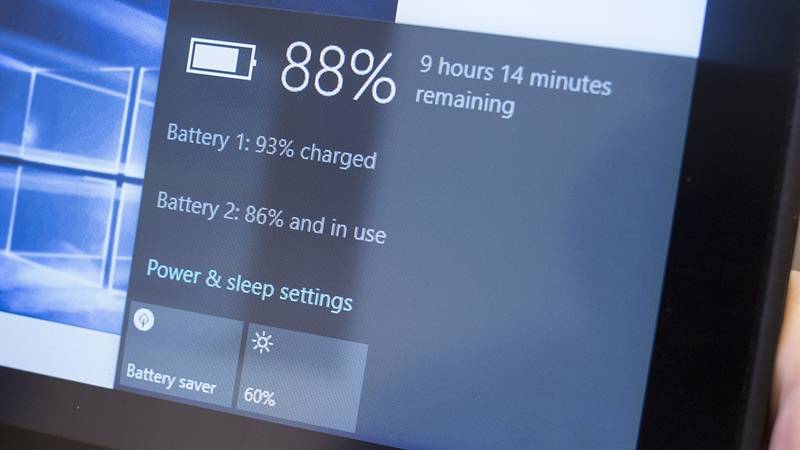
Everyone likes to keep track of their battery consumption, and while the tiny bar does little wonders for accuracy, you can find a more detailed and thorough battery report available too, giving you useful information on its overall health and how much time of use you’re getting between charges.

If you’re using Windows 10 on a tablet or laptop, right-click on the Start menu button then choose Command Prompt (Admin), then type powercfg /batteryreport /output “C:\battery_report.html” into your new command window. Open the HTML file to get a host of useful stats and data on your battery.

This \battery report continues from the older versions of Windows.

Print to PDF:

52421602

Remember when we were forced to use the XPS format with Windows 8? Those days are long gone.

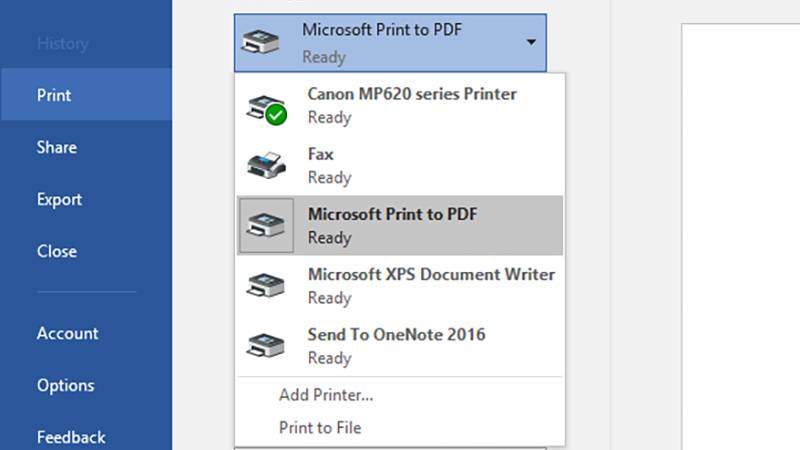
This feature saves the time and trouble of having to mess around with plug-ins to do the same job. You can freely choose an output format you know everyone is going to be able to open and view.

In whatever program you want to print from (standard desktop or universal app), choose Microsoft Print to PDF from the list of available printers. And choose your filename and location.

The God Mode shortcut:

52421603

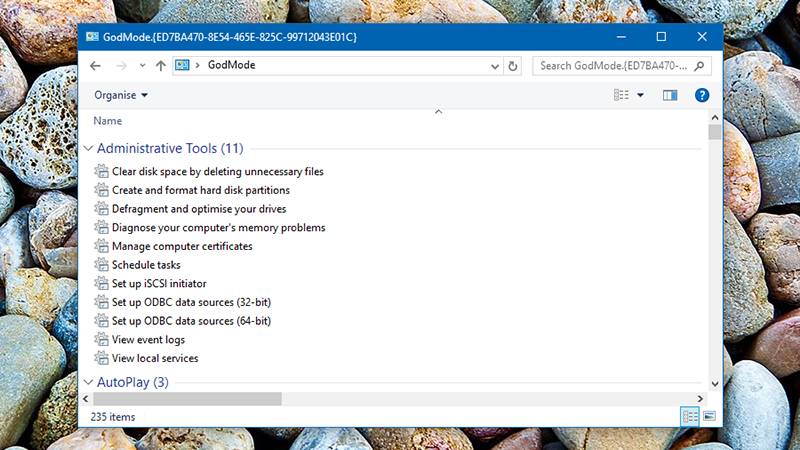
This one doesn’t take over completely, but it does give you quick and easy access to some of the key parts of the Windows operating system.

Just create a new folder anywhere you like on your system (the desktop works well) and name it GodMode.{ED7BA470-8E54-465E-825C-99712043E01C} (you can replace “GodMode” with anything you like). A double-click on your newly created folder and you’re in business, able to play around with settings for devices, networks, attached displays and more.

[adinserter block=”7″]

Next Page For More

Tagged : /

First thing first! Install THESE Apps today to unlock the full potential of your Android device!

Android operating system offers a much higher level of customization than its rivals iOS and Windows. Your smartphone has countless pre-installed features, and there’s no dearth of apps for even more.

Here’s a list of android apps that’ll make you regret you didn’t know about them before.

Discreet Notifications:

The AcDisplay app emulates the feature available for phones with AMOLED screens, which lights discreetly when there is a new notification when the screen is locked. With AcDisplay, see your notifications pop up on a minimal beautiful screen, remain for a while and then disappear.

You can instantly access them, or swipe to remove them.

The app also makes use of available sensors (Proximity, accelerometer) to turn on the screen when you take it out of your pocket, or when you pick up from a table.

It consumes surprisingly less of the battery and you’ll be hooked onto it from the start. Install the AcDisplay app from here.

Custom ROM features on your stock ROM

While custom ROMs are always useful, they take are tedious to try and install and to set up.

Gravity Box is a tweak box which brings all those features available in custom ROMs, ready to be implemented as and when you wish. You can tweak almost every aspect of your phone, right from the lock screen to the status bar to the app drawer style. You could spend an hour or so inside the app setting up your phone just the way you want.

You need to root your phone and download the Xposed Framework, through which, you can download Gravity Box. But it’s totally worth it. Download the Xposed Framework first from here and then install Gravity Box from the list of modules.

Bluelight Filter for your nerves:

The exposure of blue light from our smartphone has always been a source of debate about its effects on our circadian cycle and our quality of sleep.

The Twilight app makes your screen adapt to the time of the day. It will filter the blue light emitted by your device after sunset to protect your eyes, with a soft red filter. The filter intensity is adjusted to the sun cycle based on your local sunrise and sunset times. Use Twilight to protect your eyes, when reading in your bed before sleep and get a good night’s sleep. Download the app from here.

Essential information without having to unlock your screen:

The Dashclock widget appears to be a simple clock widget which sits discreetly on your home and lock screen. But, in reality, it could allow you take a peek into the most important notifications with a single glance.

With the Dashclock widgets and the myriad of extensions available in the Play Store, you can get all the information from missed calls to unread emails to cricket scores, right on your lock screen, in a beautiful minimalist way.

It is an extremely lightweight app and consumes minimal battery. Download the widget from here.

Next Page For More

Tagged : /

Unlock the full potential of WhatsApp with these secret hacks!

WhatsApp is a pretty amazing app. People did catch on early on. And now, as its user base continues to grow, it has managed to enter every sphere of your life. Be it friendly chats or business discussions, WhatsApp is here to stay. But are there any benefits of WhatsApp you’re completely missing out on?

To start with, constant notifications irritate us all at some point. And once you have gone online, or read a message, there’s no going back. You’ve to reply, or the person will know. Is there no way out?

Read your messages with ‘Last Seen’ and ‘Read’ status unaltered.

If you want to avoid explaining why you haven’t replied in spite of your ‘last seen’ timestamp and ‘Read’ status updated, you can use this trick.

Dedicate a home screen to a 4×4 WhatsApp widget. All unread messages will appear there, not only the most recent unread message from each chat. Read through all of those messages through the widget and your ‘last seen’ and ‘read’ status will remain unchanged. This really does work like a charm.

Transfer files of any format upto 1 GB on WhatsApp.

What, you thought 16 MB was the limit? An App called WhatsTools sits quietly inside the ‘attach’ button in the chat window (after giving permission using the accessibility service) and allows file sharing of size upto 1GB.

Using this tool, you can bypass the restriction to 16 MB.

You can also pause/resume the upload/download of files and preview video files before downloading. The files are shared through an HTTPS encrypted path and gets stored in your Google Drive account.

Delete old WhatsApp Message Backups and clear space on your phone storage.

Well yeah, your memory filling up- fast. Instead of deleting your precious photos, delete useless chats that have long ended.

To delete the older backup files, go to Internal Storage-> WhatsApp -> Databases.

WhatsApp does a mandatory daily backup in the middle of the night at 02:00. These backups are stored as separate files in the storage memory of your device and with each new backup, containing the thumbnail of all the media received along with newer chats, the file size increases, sometimes to uncomfortable proportions.

This backup to drive feature can also be used while shifting or restoring your phone.

Next Page For More

Tagged : /

No bomb can cross this scanner unnoticed!

Terahertz spectrum examining is possibly the best for searching bombs because of the complete range of materials it can reveal, however it is not practical for baggage checks, Because, for that, you will need both a suitcase-sized machine and about half an hour time to conduct the scan.

MIT researchers have developed a quantum cascade laser system, which shall make terahertz detection a reality. Because the laser’s single, tiny frequency comb merely consumes power for very short periods and you can fit it into the size of a chip without a massive cooling unit, which makes it perfect for airport scanners. It takes only 100 microseconds to identify a substance and hence you do not have to wait too long.

You will not see this quantum cascade lasers at security guys anytime soon because of breakthrough cases happening often. Princeton’s Gerard Wysocki defines this as a “great first step” towards terahertz detection rather than the end goal. The technology is relevant for security scanners, where identifying an exotic explosive can save lives, however, it can also help doctors and scientists to find traces of materials, which might otherwise go unnoticed.

[adinserter block=”7″]

As a technology lover you may like our daily important technology news series. It’s a playlist and you can retrieve the total day-wise videos. Please consider subscribing our YouTube channel:

Author: Technology and Beyond

Tagged : /

Is it going to happen? Will all Americans be Implanted with Microchips by 2017?

NBC has shockingly predicted that by 2017, all of America will be tagged with microchips. They will be implanted to help identify individuals immediately. Other than the obvious fears and speculations regarding invasion of privacy and giving the government too much power, according to the report, the technology is used to answer one question, “Am I who I say I am?”

In some states, like Virginia, legislation is in process to stop this from happening. The report also reveals an RFID Brain Chip that has been developed and is currently being tested on several humans. With the RFID Microchip the government can track the movement of the people. They can also control the money and food of the population. It is also reported to be possible to even kill the people that don’t obey. Who’s to say it won’t hack into our brains too!?

microchip1

It was reported that the use of Micro-Chips in Bill H.R. 4872 was located on Page 1014 under “National Medical Device Registry” it tells about a “Class II Device That is Implantable” and yes, they passed the bill. Read Page “1014″ In The H.R. 4872 Read Class II Special Controls Guidance For FDA Staff.

Alarmingly, the HR 3962 Bill is an exact copy of the HR 3200 bill in with the exception of just a few words removed concerning the RFID Microchip but the ability to Chip Every Citizen of the United States is still in the bill. Open Bill and Read Pages 1501 through 1510 Read Class II Special Controls Guidance For FDA Staff Read And Do The Research For Yourself.

width="560" height="314" allowfullscreen="allowfullscreen">

As a technology lover you may like our daily important technology news series. It’s a playlist and you can retrieve the total day-wise videos. Please consider subscribing our YouTube channel:

Author: Technology Vista

Tagged : /

THIS is how Google will save you despite your collision with a car!

Google robots have impressed the world time and again. This time, it is the self-driving car, which will impress you with its ability to save lives. It rarely crashes into things on the street, even if it does; it saves the victim in a very unique way.

google-car-patent-large_trans++qVzuuqpFlyLIwiB6NTmJwfSVWeZ_vEN7c6bHu2jJnT8

Google finally managed to get a patent, which it had asked for in 2014. It allows Google to apply a layer of strong adhesive glue on the hood of the car. The purpose is to get the person, who bangs into the car, stuck on the hood of the car and hence, avoiding multiple injuries, which otherwise, the victim would have faced incase of re-bouncing and banging to the road or another vehicle.

The glue, which Google proposed to use, will have an eggshell covering, so that insects don’t get stick to it before it is put to actual use.

BUT WHY WOULD THIS EVEN WORK?

Rebecca Thompson, Head of PUBLIC OUTREACH for AMERICAN PHYSICAL SOCIETY say-

“A single collision with a sticky hood is better from a physics standpoint. Getting hit by a car once is preferable to getting hit by the car, then the ground and then another car.”

As rose comes with thorns, similarly this idea is also not flawless. With a pedestrian stuck on the hood it might be troublesome for the car to move to safety, or the person stuck might be dragged along with some limb dangling under the car causing new injuries. But the advantages of this idea counters for some minimal unforeseen losses.

Yet another plus point is that, since it is a self-driving car, a human driver fleeing from the scenes because of fear and nervousness, will not occur. Thus reducing the count of hit-run cases.

While some other companies like Nissan have come up with ideas like “pop up engine hood “ where tiny explosives are used to slightly raise the hood of the vehicle once the car senses an impact, this idea of Google remains lucratively creative.

This article is not to prove that soon we will see a Human flypaper idea come to life, it’s just a to show that Google is really concerned about keeping more people on the streets alive.

[adinserter block=”7″]

As a technology lover you may like our daily important technology news series. It’s a playlist and you can retrieve the total day-wise videos. Please consider subscribing our YouTube channel:

Author: Technology and Beyond

Tagged : /

The physics behind much hyped Hyperloop: Exclusively for you!

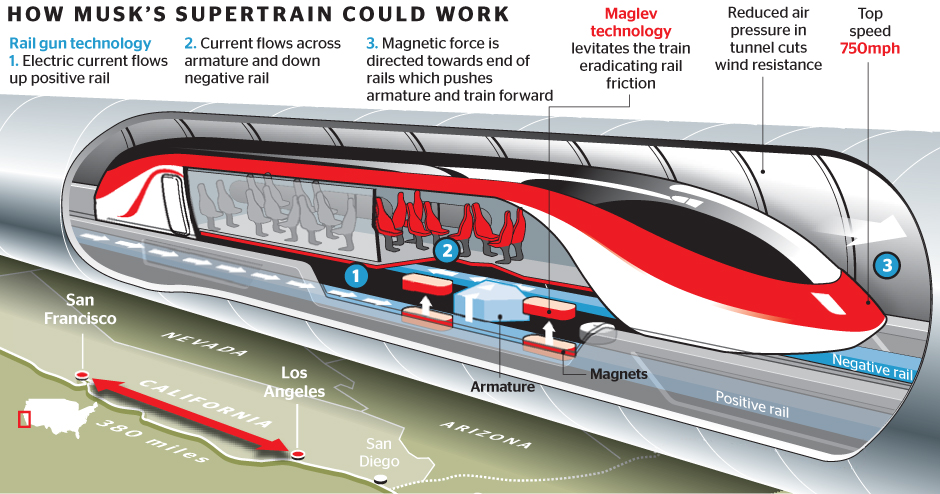
There has been a lot of talk about the Hyperloop concept and the amazing transportation system it promises to bring into human lives. This is a high-speed train that would make the trip from San Francisco and Los Angeles in just 30 minutes. The propulsion system was tested a few days ago by the Hyperloop One Company, in the desert outside Las Vegas.

Basic CMYK

In this same project, another startup called Hyperloop Transportation Technologies also announced that it had licensed a promising technology called Inductrack from Lawrence Livermore National Laboratory for its own Hyperloop design. If you haven’t yet got a chance to understand the Hyperloop transportation system and the physics behind it, then go through this article and then the video accompanying it. You will surely understand a lot.

It was in 2012, that Elon Musk had made an announcement about a new theoretical transportation method which presented the idea of a capsule that will propelled through a tube at over seven hundred miles an hour. He gathered some great minds from SpaceX and Tesla to create a prototype. Known as Hyperloop, the technology consists of a low pressure tube with capsules that transport at both high and low speeds. This system will run between San Francisco and Los Angeles and complete the journey in 30 minutes. There are certain physics concepts that it uses.

Friction and Hyperloop: Everything has friction, for example a brick lying on the floor has static friction which is the type of friction that keeps it in place, once the brick starts moving it encounters sliding friction. If something is rolling then it has rolling friction which is similar to a car wheel or any wheel in general when something is making constant contact at a particular point with a very small amount of friction. The fluid friction is when anything is moving and in counter resistance with the air for example airplanes or anything that has to move through air at a speed.

[adinserter block=”7″]

Next Page For More

Tagged : /

What should you do to restore a damaged PC due to power outage or surge?

These days, electronic devices and PCs are lifelines for us and we are completely dependent on those. But, because these devices are completely dependent on electricity, there is always a risk of damage due to power fluctuation or surge. There is always a possibility of power failure or surge due to storms, hurricanes, heavy rains, snow etc., which can damage your PCs and electronic devices.

battery

Subsequent to the electrical surge, your PC may reach a state where it won’t start at all, if the inner mechanism gets damaged. You should be aware of the precautions, which need to be taken so that your PC doesn’t get damaged due to power surge. Below are the measures which you must take to prevent damage in the first place itself:

  • Unplug your PC, in case of power outage.
  • Keep one light plugged in. This will let you know when electricity is back.
  • Have a backup of all the important files on an external USB drive. This will help you to retrieve the files, in case of data loss.
  • Install a barrier like surge protector, which shall protect your PC by nullifying the sudden power surge.
  • Having a UPS installed will give you enough time to complete your routine of shutting down your PC.

Follow the ways given below, to restore a damaged PC affected by power outage or surge.

There can be two possibilities because of which your PC will fail to start. The first possibility is damage to your power supply and second possibility is the damage to the device. You can replace the damage made to the power supply on your own, but, you need an expert in case the device is damaged itself. The following will help you to take some actions related to device damage.

Problem with the motherboard can lead to irregular working of your PC. You can correct this by:

  • Removing the small battery from the motherboard, and restart the PC, inserting the battery again after 5 min.
  • Buy an identical motherboard.
  • Buy a new motherboard.

If your PC is working irregularly, then it can be a mainly the problem of the motherboard. There is small chance that the CMOS information is scrambled. To correct this, you can remove the small battery on motherboard. Insert it after five minutes and restart your PC.

[adinserter block=”7″]

As a technology lover you may like our daily important technology news series. It’s a playlist and you can retrieve the total day-wise videos. Please consider subscribing our YouTube channel:

Author: Technology and Beyond

Tagged : /

Nokia set to make a comeback! This time with Android!

When was the last time when any of you used a Nokia handset? Ummm…. We know it’s been quite some time! But for those of you who have been thinking about where is ‘Nokia’… we have good news. According to recent reports, Nokia is returning to the smartphone market. Microsoft recently announced it’s offloading of Nokia’s old feature phone business to a Foxconn subsidiary and a Finnish company called HMD Global Oy.

nokia-2

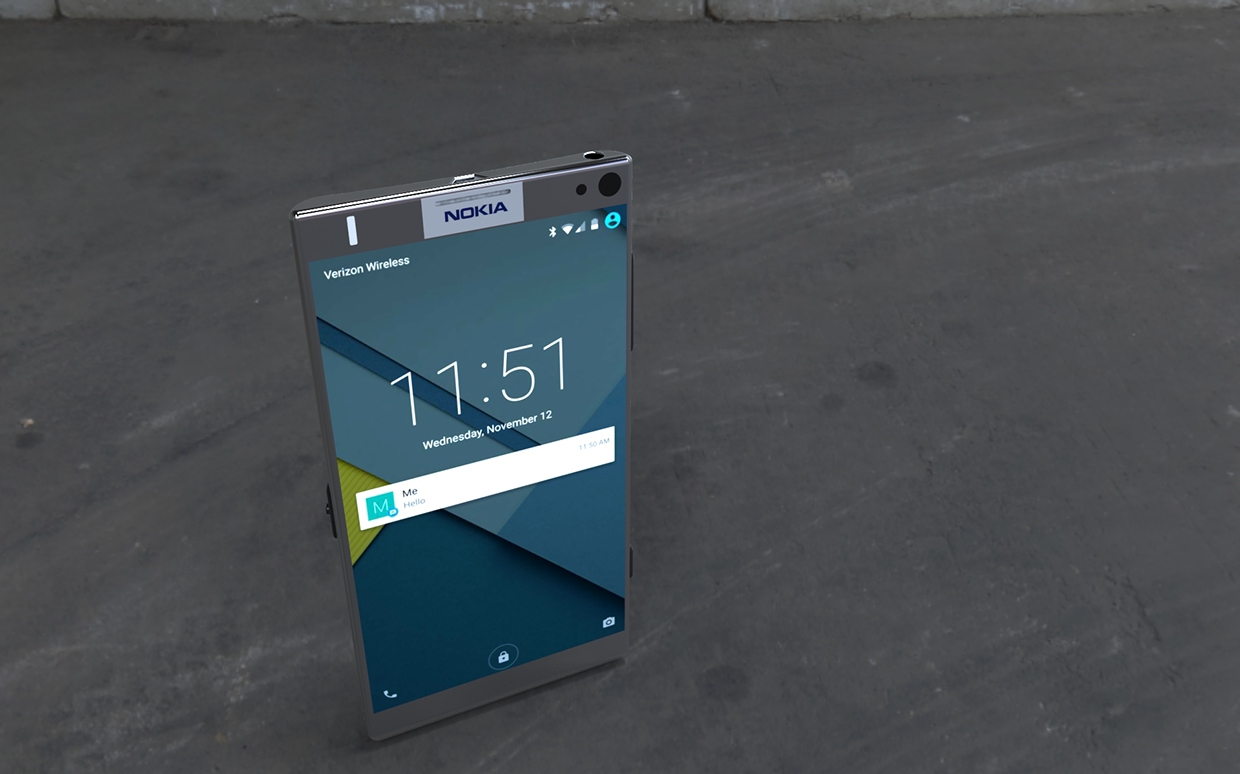
It has been revealed by Nokia that HMD is also acquiring the rights to use the Nokia name on smartphones and tablets for the next ten years. This means, the day is not far when we will see Nokia branded smartphones and tablets run on Adnroid.

According to statement from HMD, it plans to invest $500 million over the next three years to develop and promote products. The money will supposedly come from investors and from profits from the newly-acquired feature phone business. Though it has been made clear that Nokia’s involvement in the new devices will be very limited, it will be a part of HMD’s board and will set mandatory brand requirements and performance related provisions.

Nokia is doing this to ensure that quality handsets are released because it is the goodwill of Nokia that will be at stake if the devices are inferior. FIH Mobile, the Foxconn subsidiary will be the manufacturer of the new HMD smartphones and tablets. The agreement includes HMD’s access to Nokia’s vast arsenal of mobile patents. As to when will we get to see the Nokia handsets and tablets and with what version of Android, that is still under wraps.

As a technology lover you may like our daily important technology news series. It’s a playlist and you can retrieve the total day-wise videos. Please consider subscribing our YouTube channel:

Author: Technology Vista

Tagged : /

Do you not switch off your computers/ devices routinely? See why and how it is harmful!!

If you are not switching off the electric items when you are not using them, you are actually wasting electricity and electricity costs money.  Move over, you are damaging the planet, you depend on, by burning the carbon to generate electricity.

According to computer technicians, PCs/desktops are meant to stay on for long period of time but you should set your PC to go into sleep mode after a specified period of non-usage. But, in case of laptops, you need to turn it off, if it is not properly set up to permit cooling at the Base of unit. Otherwise, this may damage your device due to overheating and burnout of the processor.  To save the energy and to prolong the life of your laptop/PC, you need to keep the air vents clean. Also, most probably, you will suffer the problem of disconnect, if you will leave your modem or router on for long time.

Here is the list of problems you will suffer, if you are not turning off your electronic items for a long time:

Overheating

In the system like pc and laptop, overheating occurs due to their excessive use. It may, eventually, destroy the hard drive and you may lose your important data. Motherboard may also get burnt in this process. Therefore, in order to prevent it from overheating, turn off your pc/laptops and make sure, proper air should enter in your pc for cooling purpose.

Wi-Fi or internet network problem

In case, there is some problem associated with your Wi-Fi and internet connection, there is a chance that it is related to the software of your modem or router. In order to solve this problem, restart the router by unplugging it from the power socket and then plug it back. This, power cycling, enables the devices to boot afresh and acquire a new snapshot of the network. This is especially required when there is some change in the network in terms of hardware, software or configurations.

That’s why it is important to turn off your pc, laptop, router, modem and other electronic equipment as and when possible.

Here are the reasons to keep your pc/laptop on and off:

Reason to keep it on 

  • When you are using your computer as a server.
  • When you are allowing activities like background updates, virus scan to occur while you are away.

Reasons to keep it off:

  • To save electricity.
  • To increase the performance of the electronic items.
  • To slow down natural degradation process

[adinserter block=”7″]

As a technology lover you may like our daily important technology news series. It’s a playlist and you can retrieve the total day-wise videos. Please consider subscribing our YouTube channel:

Author: Technology and Beyond


Tagged : /

Google Gave Us a Million Reasons to Buy Chromebook!

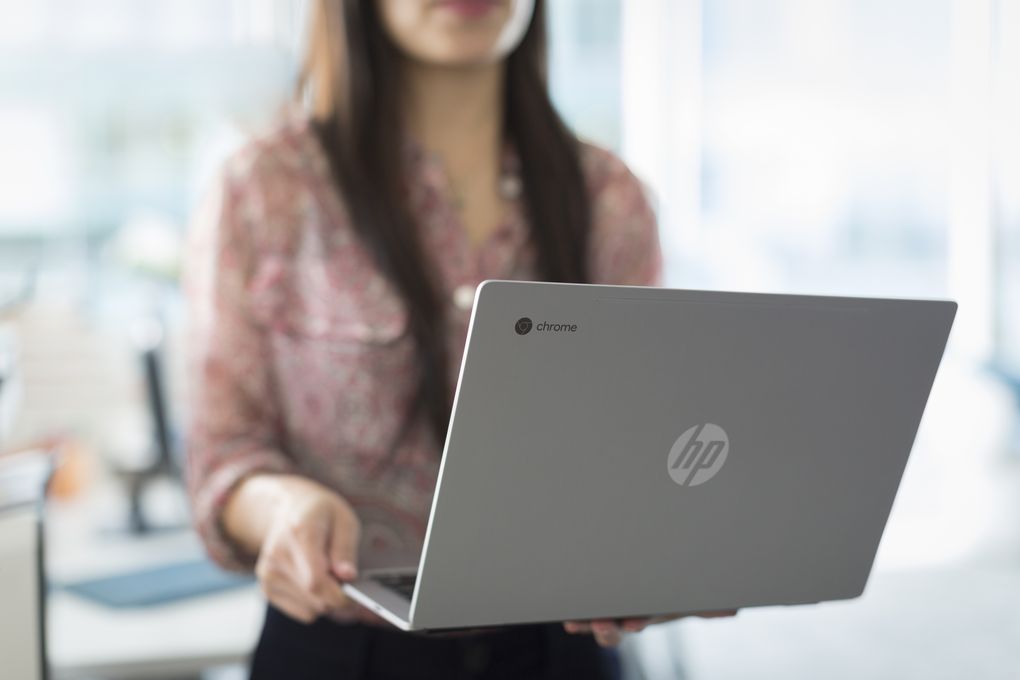
First spotted by 9to5Google, and now confirmed by Google itself, that Chrome OS will open up to Android app developers this June. Android would be pulling the Google Play Store, along with its one million apps, into Chrome OS. And Google hopes that within a couple months, apps will move to a stable beta release and finally work on Chromebooks this fall.

new-chromebook-pixel-2267.0

Sundar Pichai talked about bringing Android to Chrome OS all the way back at Google I/O 2014. That promise resulted in a limited project, called App Runtime for Chrome and brought a dozen or so apps like Duolingo, Evernote, and Vine to Chrome OS. Now, you’re getting all of them-that is if developers build the apps for the platform.

We can expect that the Android Apps can be shown in 3 different window sizes to allow the best experience. Users can multi-task with multiple Android apps in moveable windows along with a full desktop browser, all within the familiar Chrome OS interface.

As explained by the Android developers, the keyboard, mouse, and touch input will seamlessly work together, and the users will get Android notifications on their Chromebooks. Android apps benefit from the Wifi or Bluetooth connectivity setup by the user or the administrator.

File sharing is seamless between Chrome and Android apps through the Files app. The performance of demanding apps such as games or design apps is excellent.

Chromebooks have been cheap and convenient, but lacked the App Store to make it a true laptop competitor. But now, it has that too. Some apps won’t be tethered to an internet connection like normal Chrome apps, making Chromebooks an online and offline machine. Of course, some apps that require smartphone-specific hardware, like GPS, might not work on a Chromebook at all.

These apps still need some time to be developed and fully compatible. The new feature will first appear on the Asus Chromebook Flip, Pixel 2 (2015), and Acer Chromebook R11 in June.

[adinserter block=”7″]

As a technology lover you may like our daily important technology news series. It’s a playlist and you can retrieve the total day-wise videos. Please consider subscribing our YouTube channel:

Author: Technology and Beyond

Tagged : /
Verified by ExactMetrics