Fast Forward to the Future: Smart Contact Lens which functions with the blink of an eye!

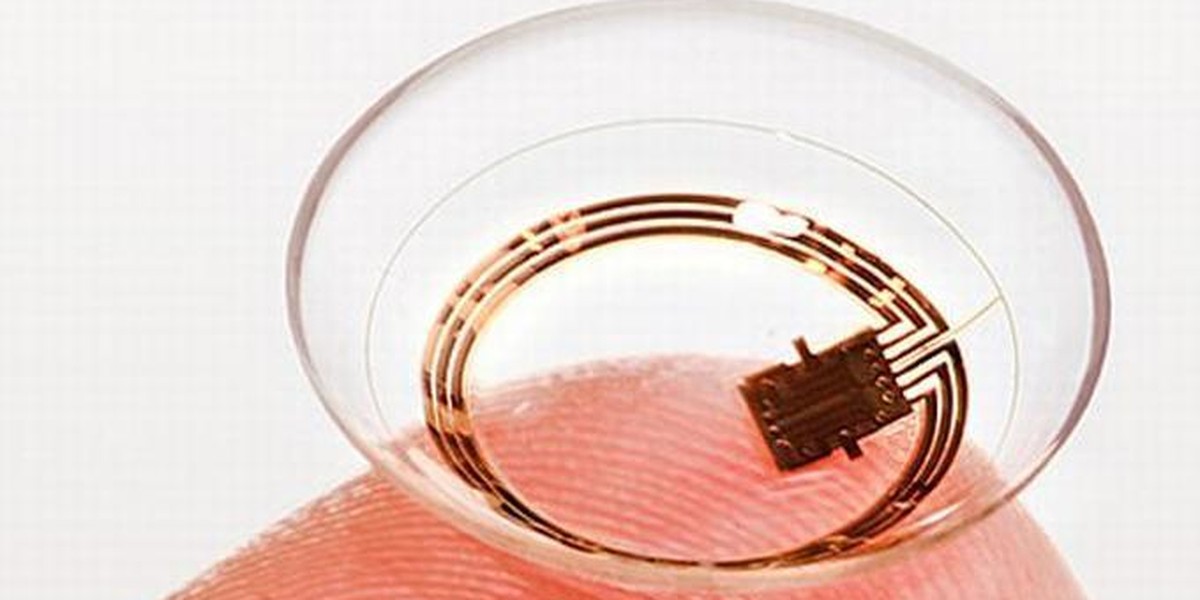
Samsung, the multinational company of South Korea has recently granted a patent for ‘smart contacts’. Because this project is still into the planning stages, this patent just gives an idea about what future technologies will look like.

As on date, the smart contact has built in sensors and camera that can be controlled through blinking.
1200x600

Google and Samsung are the only companies who have patent for this kind of wearable technology. Google shows interest in medical pursuits and hence, their contact lenses aspire to be capable of detecting blood sugar level through tears.

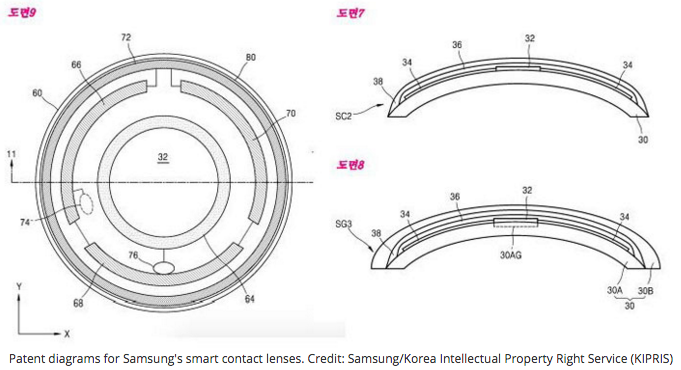
Design of Samsung is suitable for wide range of applications. The in-built camera of Samsung’s smart contacts is also fitted with antennas which will facilitate the transfer of recorded information with other smart devices.

The reason for avoiding direct eye contact with such devices is still not known. It seems that wireless informative device which broadcast information is not beneficial. This device may subject the body to electromagnetic fields. And danger of EMF is already proven in terms of their linkage with cancers and tumors.
Screen-Shot-2016-04-11-at-8.26.17-PM

This device has the capability to revolutionize information collection process. However, authorities are needed to streamline the privacy laws according to new advancements. If one can record information just by looking at it, it will be a major concern. It is possible to steal corporate secrets just with a blink of an eye. However, this device could be helpful in law enforcement, as authorities may record the activities of the cops more intensely.

[adinserter block=”7″]

As a technology lover you may like our daily important technology news series. It’s a playlist and you can retrieve the total day-wise videos. Please consider subscribing our YouTube channel:

Author: Technology and Beyond

Tagged : /

Take that! According to new quantum equation, there is nothing like a big bang and universe has no beginning

If we think about the scientific reality, there is no dearth of theories. It’s like race with amnesia, where we are trying to discover and search for an answer that probable exists, but it’s yet to be discovered.

7aefb94d-ee19-4f0b-ae10-ff2cbdbfe880-1020x788

What is the beginning of universe?

According to latest research, there was no big bang. Big Bang theory is replaced by an assumption that universe might have existed forever.

 “The Big Bang singularity is the most serious problem of general relativity because the laws of physics appear to break down there.” 

The postulate of big bang theory is that everything in existence is a consequence of single event that formed the whole universe and everything in today’s existence was once a part of single infinitely dense point or “singularity.” It created space when there was no space before, and it is expanding constantly.

 “For every action there is always an equal opposite reaction.” is one of the most foundational and established concepts in all of physics.

 The following are some of the criticisms about the big bang theory. There are so many considerations to deal with. How something can come from nothing? What about the prospect of the moment when there is no moment of time at all when universe was not there in existence?

In quantum theory, the scientists propose that quantum fluid might be composed of gravitons—a hypothetical mass less particles that facilitate the force of gravity.

According to theory, there are no singularities or dark matter, and the universe is just occupied by a “quantum fluid.” Scientists claim that this quantum fluid is filled with gravitons.

“If we throw quantum mechanics into the equation, things will appear very different. Again, there is new theory suggesting that the universe could have always existed, and there was no “the beginning.” Probably it was just an event which we considered as “the beginning”, probably the event occurred from something.”

Next page For More

Tagged : /

THIS is how to automatically load your favorite programs during Windows 10 startup

It’s a feeling of disappointment and distress when one turns on the laptop or desktop and it starts really slow because of a lot of unwanted programs. Windows 10 users are a little lazy about this, as they think it cannot be changed, because of system default. Well, there is good news, you can now disable unwanted programs from the task menu so that they don’t interrupt when the system boots. Working on the system will become easier as normal hang-ups will be eliminated.

However, you may feel like adding a few of your favorite programs in the favorite list. This will enable Windows 10 to start those programs during start-up. You can achieve that by adding these programs to the favorite list. If you follow the steps below, it is easy to do so:

0321-drag-from-start-100648339-orig

The first and foremost thing that you should do is to switch off the tablet mode, so that you are working only on desktop.

You need to open the start folder from the left side of the screen. When start folder is open, press winkey+R to get into the run window. Alternately, you may press the Tab key and hold the start button or simply right click on the soft start button to get the run menu.

While the Run window is open, “shell:startup” and it will bring up the startup folder on your desktop screen. Most probably, the folder will be empty as there are other methods available to autoload your favorite programs.

Creating shortcuts in the startup folder is easy. Just right click anywhere in the empty space and use New>Shortcut menu and follow the wizard and you will be done. This method may be a bit complicated for the newbies but regular users should not face any difficulty on that.

Another easy way is to use traditional drag and drop feature to add the icon in the startup folder. You need to press Control C in order to have icons in both the places (origin and destination folder). The icons may not be there on the desktop and in that case, just search out the folder where the icon exists.

Once you added the programs in the startup folder, the next time, when you boot your system, your favorite programs will be autoloaded along with the boot process.

[adinserter block=”7″]

As a technology lover you may like our daily important technology news series. It’s a playlist and you can retrieve the total day-wise videos. Please consider subscribing our YouTube channel:

Author: Technology and Beyond
Tagged : /
Verified by ExactMetrics