Cloaking Technology: How it works and Why it is a promising technology!

atravesar las paredes 11

During April 2151, humanity encountered the first cloaking incident when Suliban used their cloaking device to approach Startship Enterprise and managed to inflict a close fight. Yes, you heard it right, we are talking about Star Trek stories. Suliban’s cloaking device was a particle generator which absorbs all the light making it invisible. In the scenario of dark space it may be possible but when it comes to its application on earth there is a major practical difficulty. The cloaking material may absorb the light but in turn, it will create a black patch and will obstruct  the background. That serves no purpose because the object can be identified by its dark patch.

Invisibility_Cloak_610

The major idea of invisibility came into forth when the idea of light bending the across the object came into picture. The whole idea was to pass the light across the periphery of the object and then clubbing the light together. This helps in seeing the background behind the object thus making the object completely invisible.

chamikawpblogspotcom2-141

Scientists has successfully tried this with a diamond-shaped cloak allowing the edges to match up. By this process, they were successful in bending light around their 1 centimeter high, 7.5 centimeter wide cylinder without reflections. When it comes to replicating such things with bigger objects it becomes almost achievable, let alone making a complete starship invisible.

flatinvisotiles2 cloak

invisble1

In the picture above, the object wearing the cloak appears invisible because the background visual is being displayed onto the retro-reflective material. At the same time, all other light rays are allowed to reach the user’s eye, making the person in the front completely invisible. [image : Howstuffworks]

Bending of light across the periphery of the object sounds simple but difficult to achieve. Scientists have come out with various meta-material structure with intricate slits and cuts across the periphery of the object to channelize the light streams in proper direction and then clubbing the same behind the object. Manufacturing such accurate and intricate meta-material structure is always costly and challenging and sometimes almost impossible. On top of that, It is easier to hide objects from other waves like heat, magnetic fields or acoustics. Scientists are not that successful replicating these incidents with Light waves having longer wavelengths

Wasser-Tarnkappe / Sonar

Invisibility-cloak-tsunami-stopper

Advent of 3D printer solves this problem and you can print such intricate structure accurately.  You will not be surprised if you hear scientists are cloaking bigger materials with the 3D printed meta-materials.

3d printed invisibility cloak

Recently Scientists are successful in creating a cloak in entirely different way. This is done by creating a time hole/ time gap in the light stream. It is more like fast forwarding the front of the wavelength and pulling back the trail of the wavelength. This is even effective in cloaking a total incident. it can be explained like this:

The rays emanating from the slits combine on the other side to create an intricate interference pattern of peaks and troughs. Talbot discovered that this pattern repeats at regular intervals, creating what is now known as a Talbot carpet. There is also a temporal version of this effect in which you manipulate light over time to generate regular periods with zero light intensity, says Lukens. Data can be then be hidden in these holes in time. [Nature]

Invisible Time

In simplistic term if you imagine the bus-scene in the movie Speed in which the good guys use a short loop of camera footage of all the passengers sitting still to fool the bad guy into thinking that everything is going his way. During that time, the hero was helping everyone to escape. The invisibility cloak with time gap will be able to do that when it will be available in scaled up version.

s3

  • Coming to the usage of cloaking technology, it will have various utilities in the form of:
  • Cloaking various vehicles during  war or to hide the supply chain in hostile location
  • Commando team can observe the hostage and the extremists beyond the wall in front and drive the operation accordingly
  • In medical field, it will be extremely useful for surgeons to see the actual part of the body/ tissue beyond the tools and/or equipment that comes in front
  • The time gap cloak will be extremely useful to hide events in future. In near future, we will see its practical application in secure data transmission by hiding the data partially or completely in time gap.

Possibilities are endless and endless are the practical challenges. But in all probability we have to wait a while before we see a flawless and practical demonstration of invisibility cloak.

As a technology lover you may like our daily important technology news series. It’s a playlist and you can retrieve the total day-wise videos. Please consider subscribing our YouTube channel:

Author: Technology and Beyond
Tagged : /

Google’s new Chromecast: what it is and how it can be a game changer!!

page_chromecast
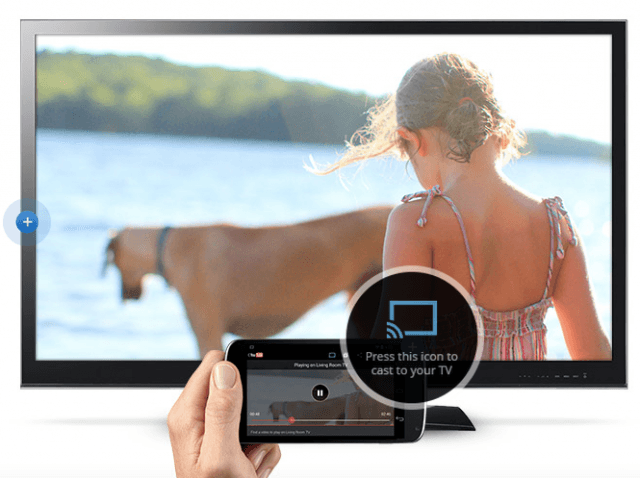
Chromecast is a new USB like device by Google which plugs into the HDMI port of of your conventional TV. It is a powered device and needs power connection to run. It runs on new “Cast” protocol by Google and communicates with many devices which run on the same Wi-Fi home network. The devices need to be compatible with released Apps (currently available on IOS and Android). It is this Apps that diverts the media (music or video) to you TV.

27

Chromecast is of 35 USD, running on Chrome OS and is having 256 KB of memory (looking small, isn’t it?). Despite having a small memory it can stream standard resolution video of 1080p. So, what exactly Chromecast does?

  • Streams music and video to your TV wirelessly
  • Mirrors the screen of your IOS and Android devices ( there is possibility of heavy battery drain of your device)
  • Plays YouTube and Netflix video directly from devices to your TV. The Apps on the devices  are asked if these media is to played on the device itself or on the TV
  • Though this device is currently not meant for Internet browsing on TV, it still does that with some glitches

List of Pre-requisites of this Chromecast device is not small. You need the following:

  • A smartphone with Apps installed
  • HDMI port on TV
  • A power connection for the device
  • And finally, a common Wi-Fi connection

Going by my Google TV experience it can safely be said that you need a strong Wi-Fi presence and a router of modern generation. By all probability the older router will not be detected by Chromecast.

51471-chromecast

Google TV (around 125 USD), which runs on Android  is the big brother of Chromecast. It converts your ordinary TV to Smart TV in comparatively inexpensive way. You have got special Google Apps store with numerous Apps available for various purpose. The major difference between Google TV and Chromecast is the immersive experience of Google TV with numerous TV channel viewing option, Games, running Apps like Skype etc. But, its small brother can stream the smart devices and Google TV, till now is incapable of doing this. Google is not planning  to abort Google TV as yet and  intends to add this missing functionality soon. Google TV has got many variants and one of the major variant is by Logitech called ‘Revue’ which has got a remote portable keyboard cum remote along with the box..

1372329084452ba-514x600

So, what is strategic in that? and what’s the fun of bringing in overlapping devices? It is probably part of a bigger scheme. You might have heard about Google Fiber   ,Google’s ambitious project of high speed Internet connection. Smartphone market dominance, high-speed Internet connection and end delivery device and browser based operating system (Chrome)…isn’t that sounding like a grand plan? One of the major aim of Google is to do away with the satellite TVs , cable companies and even the smart TV manufacturers in the business of entertainment.  Google has got two major competitors here, Apple TV and Roku HD box and streaming stick. There is also Amazon, with its Kindle series device and Video delivery system. While Google tops everybody with the total eco-system, Roku and Amazon is slightly ahead in content creation and sourcing. Roku alone provides seamless connection to YouTube, Netflix, Amazon, Hulu, HBO Go and other channels.

roku_lt_family1apple-appletv12-rear-lg

So, why all the big players are veering around this channel? A simple answer comes out from Sundar Pichai of Google in his recent interview . According to him,  49.5% of the net usage in USA is attributed to YouTube and Netflix alone and that average US household spend 4.5 hours daily on TV viewing. TV being so common a device, the usage is expected to be much higher. So, there is a vast gap between perceived demand and supply. Therefore, Google and other players are simply trying to be the early bird in the morning!

Author: Technology Blog

Tagged : / / /

Chromebooks are coming, slowly but surely and why we should not be an Ostrich to deny the inevitable?

Chrome-OS


I am always-connected person starting from the days of introduction of Internet in my place. But when I first heard about chromebook about three years back I was very apprehensive. “Always connected? how it is possible in most of the third world countries?”, ” Will I not be able to operate it without internet connection?”, ” No data with me when I need it? and if I need to edit my documents when Internet is not there?”

On top of that, there are other associated questions as well, like, “everything is to be done from within a browser?”, “And is there no start button and nice stack of programs/ application above that?”, “Do I need to search for everything I need to use?”

Chromebooks have come a long way overcoming these problems. Before answering all the above question in detail, you need to answer a simple question of mine that “how long do you spend in browser compared to other programs in your Notebook/ Laptop?” after answering this we need to know what these Chromebooks are meant for.

What it can do:

Portability

Being lightweight it’s very easy to carry,. Hardware, software and batteries are in synchronization to give you a long battery life even with continuous usage. It has many connectivity options like 3G, Wi-Fi, 4G / LTE

Ease

The system boots and shutdowns in seven seconds or less. There is seamless integration across Google accounts. Backups are virtually instantaneous. Security and system updates are automatic

Cloud-Computing

Cloud connection

Have you ever taken a look at the Chrome Web Store in your Chrome browser? I bet you will be surprised to see the flurry of Apps and most probably there is everything you can think off. Just download an Apps or an browser extension to get your work done. To name a few:

  • Google DOCs to cater to your word processing, presentation and spreadsheet needs
  • Lots of photo editors
  • You Tube and many other video sites
  • CAD applications and editors
  • Cloud drive integration of your choice (Google drive, Dropbox or Skydrive)

Chrome, being a thin client, can not only perform the above tasks, it stared supporting wide range of monitors, camera, televisions and projector so that you are not stranded with the hardware compatibility.

Browsing
As you all know, Chrome is the top choice browser. It uses the latest technology and supports HTML5. the browser/ your Operating system is always updated.

Communication
With the built in Webcam and microphone you are armed to visit the social networking sites of your choice, use Skype or Google Hangout effortlessly

Security
Chromebooks are some of the most secure devices available today. Verified boot ensures your file system hasn’t been tampered with. There is also the option for two-step authentication to further increase security. All your data is stored in the cloud, so even if your Chromebook is lost or stolen, your data is still secure and easily available by logging in to another system. At this stage, you don’t need an anti-virus software for Chromebook

Remote Operation

Chrome has come a long way to support cloud printing i.e. designate a printer and always take printout through that irrespective of where you are. Advanced applications have come in which eliminates the applications like LogMeIn etc. If you think about most of your office applications you will find out that most of them are web enabled. The only hitch is now to use functional legacy application. This cannot be remotely accomplished to your fullest satisfaction till now. But, I am sure, with growing demand these software vendors will be forced to tow the line.

So, is it the right time to jump in the bandwagon? or do you need to wait and watch? let’s have a look:

The Future

In Google’s latest earnings call, CEO Larry Page spoke about the serious part of the company’s future and it appears hardware will play an important role. Although many of the next Chromebook details remained cloaked in secrecy, one can easily assume they will be pumping sexy quad core processors ready to impress. Courtesy of a Google + blog post, it now appears Google is evaluating three different ARM prototypes in addition to new Intel units. They are currently Being Tested by Code Name:

  • Peach Pit (ARM)
  • Sonic (ARM)
  • Puppy (ARM)
  • Haswell (Intel)


chrome-web-apps-570x500

On the software front, lots of developer have already joined the bandwagon. You can see staggering numbers of applications in the Chrome Web Store. Not only you have tons of choices on productivity Apps you have your share of games / entertainment program as well!! Have you tried Angry Birds in your Chrome Browser? It’s here.  If you try connecting a remote computer for helping out your friend in some computer related issues, it is here

Where do I get a Chromebook and how costly they are?

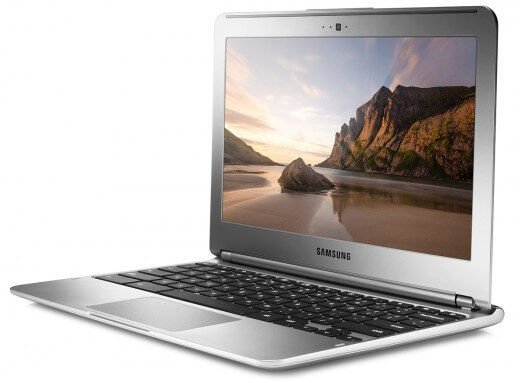
Samsung-Chromebook-Series-3-overview1_original


In fact, there are already some decent Chromebook in the market. Most of them are below 200 USD. As per rumors, this price will be further pushed down to below 100 USD in next generation one. But why to wait for future? If you have some fund take a look at the array of Chromebook here. They are not going to disappoint you.

Grossly, if you take a look at the current availability, manufacturers are building mostly low-end machines, mobile thin clients aimed at schools and semi-impulse buyers. They include HP’s Pavilion, at $329, the updated Acer C7 at $279 (there’s a $200 version), and the $249 Samsung. Lenovo’s new ThinkPad X131e Chromebook, at $429, is the only one, outside of the Pixel, to ship with 4 GB RAM. HP has the largest screen at 14″. These prices are ever changing in the downward direction.

Google’s Pixel tells us that the Chromebook deserves serious hardware. Reviewers gush over the Pixel’s hardware, its retina-plus display, but think at $1,299 it’s too pricy. But when the Samsung 550 arrived nearly a year ago with a Wifi version at $449,

Expert estimation

Gartner, the research firm, suggested that there’s a chance. In a research report published Monday, Gartner said it believed that consumers would become increasingly attracted to devices like the Chromebook and other thin and lightweight notebooks. Part of the newfound interest in these notebooks, Gartner said, will come as more of these devices include Intel’s new processors, called Bay Trail and Haswell, which raise performance and battery life.

Gartner estimates that shipments of these notebooks, which it calls “ultramobiles,” will grow to roughly 20.3 million this year, up from 9.8 million last year. Still, Gartner predicted that the overall PC market, including ultramobiles, would probably shrink this year. It estimates that worldwide, manufacturers will ship 305 million PCs, down 10.6 percent from last year.

In another sign of how grim things are looking for the PC, The Korea Times reported Monday that officials of Samsung Electronics, the South Korean manufacturer that is the biggest phone maker in the world, said the company would stop making desktop PCs because demand was low and the devices were unprofitable, and would instead focus on tablets and laptops. On Tuesday, however, the company said the report was “groundless.”

 Answer to my original questions:

  1. Chrome is always connected and that doesn’t mean that you cannot do anything without being connected. There are offline modes much like using Google Docs in offline mode. The most attractive part is the availability of free resources for doing almost everything. In the advanced stage, if you need to extract more from the Apps, you may have to consider for subscription based models.
  2. Your data is always synchronized and backed up in the cloud whenever you are connected. But when you are not,  you can use it’s medium sized solid state internal storage for file storing. Alternately, you may also use USB sticks/ SD cards to expand your storage.
  3. Regarding the security of cloud storage, it’s a generic issue rather than a Chromebook issue. The cloud storage is the future and suppliers have to take care of the security aspects. You are even using cloud storage with PCs, MACs or tablets. So, you are as safe or as vulnerable by using Chromebook
  4. There is no need of a start button, applications are stacked nicely in the browser with large thumbnails and they can be easily found out in alphabetical order. I am sure more innovative ways will come out in future.
  5. You may be actually spending not less than 65%-70% of your usage time inside browser or browser related products of different variants

To conclude

  • The Chromebook is obviously not a tablet with a keyboard. It is not a netbook. The Chromebook is a threat to everything, especially PC makers and tablet makers. Users want portable bigger and brighter display but with portability. That’s why large screen phones/ phablets or tablets are flourishing today. But they are not thin clients, they are rather mostly media consumption devices. Rising of Chromebook will upsets the apple-cart of entire hardware/software industrial complex of pre-installed systems.
  • The main worry is that Google has to rein on the hardware vendors so that they don’t turn chromebook into another netbook fiasco by providing inadequate hardware.

future


Last minute inclusion:

Chrome launcher


Just yesterday, Google released its Chrome Apps launcher for Windows. You don’t need to open a browser to launch any Chrome application. Rather you are provided with a start like menu. End of conventional Operating Systems are near at least in the common user segment (client side of computing). Let’s see who reads this inevitable first….

Author: Technology Blog

Tagged :

Google Translate – Mighty Service in Practice

Google Translate – Mighty Service in Practice

Ability to communicate in several languages ​​is determined by the particular course (or faculty) for learning a language, or at least the initiative for independent learning a language through various resources. However, today there is a special tool for this purpose and is free to use thanks to Google.

Google Translate provides more opportunities and solutions to enrich our vocabulary and in several languages​​. In addition you can find the www.translate.google.com where we use the known methods of translation, the text that follows will consider all useful and usable examples using automated translator in practice.

Regular way of translating content from one language to another is done by visiting the online service By Google and Inserting a copied text or simply typing in the text box stating the original language. The text immediately translated into the selected language in the right side and have immediate results of Google translation web-service.

google translate example

google translate web site


after google translate web site

Also if you want to translate the whole website then Inserting text field for inserting the URL path of the web page (eg www.itadvicex.com) and click the translate button, and then you can click on URL link of the web site you want to translate.

This most users might know, but now there are opportunities for more flexible use of Google Translate service in the Internet browser.

Google Toolbar

One of many examples is the use of Google toolbar plugin for Internet Explorer or Firefox. It can have a direct use Google Chrome internet browser. Support for Google toolbar plugin is broken for the new versions of Firefox ( still can be found on external web sites to download for older versions of Firefox), while support for google toolbar for Internet  Explorer still active and can be downloaded from Google web site .


google toolbar


But this accessory but provides some advantages in the use of most services from Google has an interesting collaboration directly with the page you are viewing. We provide real-time translated segments of a web-page or selected parts of the same text. If Google Toolbar is too advanced for some tastes, then warmly recommend “bookmark” button (http://translate.google.com/translate_buttons) with the selected language. Drag and drop the links of favorite languages to bookmarks tab ​​and the story is over. For any web page you visit in the moment, just click the button and the page is translated to that language.


Google translate browser buttons


google translate buttons drag to bookmarks bar

Translation of documents

There are several ways to use Google Translate for translating documents. For all the familiar Office files that are attached to the attachment point for documents, Google Translate us immediately submit the translated copy, known format of text documents are supported: PDF, TXT, DOC, PPT, XLS or RTF. Moreover there are expanding opportunities for manipulation and editing of the translation of the document.

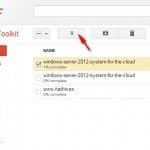
Google Translator Toolkit is a service that we use the same user profile that applies to all Google services and web-applications, like gmail etc.. Provides a simple user interface where you have a list of documents that are attached to a translation . If you have some understanding of the language in which they translate, then you can do intervention directly in the translation. This set of tools allows such intervention, and also by helping to improve the understanding between the two languages​​. Besides the updating documents, enabling the creation of a document from a site in a given language. If you want to translate any web-page to enter the same URL link and Google Translator Toolkit us create a document containing its translated version.

By the same service we can share documents with other people and to work on improving the translation. The service provides several ways to edit the text content, but do not expect many opportunities for translation.

Translated Search

This is one of the most interesting ways to use the Google translation tools. Access to Language tools has www.google.com directly to the input terms. It does not redirect to another page where you can select a language. Once we have selected, you can now select few languages ​​that we want to see results. Subscribed word search and simultaneous translation of web-pages that we have received a proposal from Google how something fantastic. The results can be from anywhere in the world, the local language and we have the luxury it to understand the ways language. If you want to find something, but the results you get are some languages ​​that do not understand. Language tool will allow us all to get already translated into our language. We recorded what we want to find, select several languages ​​and work is completed. Besides the original term translated into selected languages ​​Google I present the results of my language, and as these web-sites are originally French, Italian, Indian, etc.

Sound Translation

A major step forward for this service, which can only be applauded on Google. This was introduced as a technology that Google will read the letters and you can put together the sound of sentence letters. But it quickly spread to gTalk, because many people experimented directly there that made ​​Google to insert sound recognition of text anywhere in Google services. It expanded so that the last time we see Android App and iPhone App that can work as a universal translator with direct interlocutor. If you saw Star Trek this will seem like a dream come true. Record our voice by saying that we want to say using the microphone of the phone’s software application and just choose the language you want it translated to hear. Results and we have now and we tune translated sound recording to speak for us, a voice message telling you to our correspondent on his language.

Google translate sound translation

These apps have been tested and put into use for most Android OS and iPhone iOS. Imagine how many opportunities open this kind of communication. You have not studied a language, and you can safely and fairly understandable to interact on any level with your interlocutors.

Inserting these capabilities for translating Google proves his consistency and innovation. The language barrier is a concept as it begins to slowly fades away and coming era when everyone will be able to understand each other. Certainly there are not that mentioned the details of this translation service offered by Google, but you is free to explore, test and trying to use the benefits of this service.

Guest Blogger : http://www.itadvicex.com

Smart Watch- The past, the present and the future and why it’s a bright idea to pursue

Wearable Technologies are in their infancy but it seems all players in technology market knows the importance of it. There have been numerous experiments and raw products in their Alpha stage. But, nothing else caught the fancy of technology lovers the way a smart watch ignites their passion. combined concept

The Past Interestingly, the genesis of Smartphone is quite old. The idea of the connected watch has been there around for at least one decade: During 2003, Microsoft have tried to involve themselves in this industry e. But after spending substantial money and effort and futile  partnership building exercise with some watchmaker firms like Suunto, Fossil and even Swatch, they have put this project in cold-storage during 2008. The idea was to make a smart watch product costing nearly $800, but probably at that time the the people was looking forward towards something else

Microsoft effortThe above design is probably what Microsoft could produce at that point of time. It can be very clearly seen that the concept was much different than the present day one. The present There are few different concepts which are called smart watches currently. Health wrist wares: Since the release of Nike’s Nike+ FuelBand , jawbones and Motorola health watches there have been excitements in this segments. The wristband monitors the wearer’s gym performance/ exercises, and can upload information to smart phones like the new Samsung Galaxy S4 or an iPhone. Wearable health wristLimited function open interface watches: Result of Kickstarter project, Pebble watches can change the interfaces and looks instantly, thanks to its brilliant, outdoor-readable electronic-paper (e-paper) display. There are already tons of designed watch faces, with more coming every day. Choose your favorite watch faces using Pebble’s iPhone or Android app. Then as the day progresses, effortlessly switch to the one that matches your mood, activity or outfit.

Pebble  

 First generation smart watch: Taking touchscreen technology to a whole new level this smart watch from Sony works on battery with Android platform. These batteries of this gadget can be charged using a standard USB connector. Breaking the rules of a normal digital watch, this magnificent creation has a dial that offers 1.3 inch OLED display. You can make different applications run on this watch having a touch interface, just as you do on your smartphone. It will not only helps to keep up with time but will also offer other hi-tech features like email display, music player, social portals, answer or decline calls. On receiving a message or email notification, this watch displays a message on the dial and vibrates as well. Along with date and day display, this watch also features a calendar, letting you plan your days systematically.

Sony Smart Watch- Unisex

The growth drivers: while evaluating the future we must understand the driving forces behind the demand and supply segment.

  1. Busy lifestyle: probably the main need originates from our busy lifestyle. In the era of information explosion everybody wants to catch up with all the information but in abbreviated  manner. Everybody would love the ability to have alerts right on the wrist to glance at really quickly. This is with the desire not  to miss something urgent or needing attention right at that moment
  2. Stylish way: An intelligent device on the wrist is always an ultimate style statement and reflects ones status and position
  3. Easy alarm/ reminders: Alerts set on the phone is often missed because it is set in silent/ vibrating mode, its not nearby or placed inside a pocket. A small vibration at the wrist would be impossible to miss.  Having Siri integrated right into the watch would make setting reminders, tasks, and appointments a super easy and powerful feature to have available instantly right at my wrist.
  4. Alternate authentication mechanism: smart watches can be designed to pair with a mobile device,. That pairing offers an easy way to set up advanced authentication. This could replace a passcode on an smartphone or on laptop/ desktops. The pairing technique can either be Bluetooth or by NFC..
  5. Additional security: A third level of authentication like bio-metric sensors or face recognition can easily be implemented through a smart watch.
  6. Ethical issues: People consider it less offensive when the look at the wrist during meeting or conversation than looking at a mobile. The comfort level is higher as this is worn like an attire.
  7. Health parameters: It is easy to implement heart beat monitors, body temperature measurements and mood assessments as it is worn on a vital point of the body like wrist

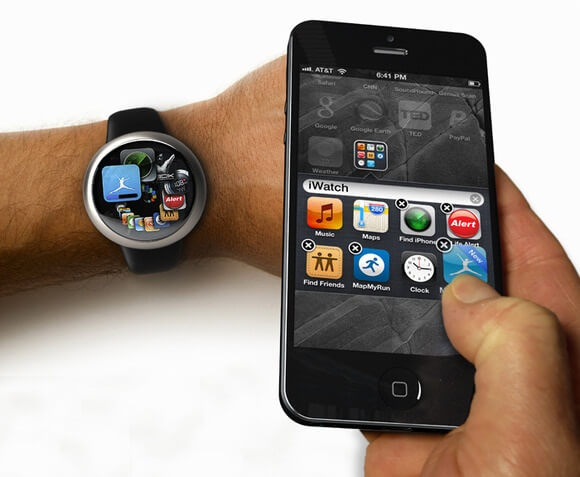
The picture below describes the possible architecture of a smartphone. Though it is shown in the context of a specific smart watch (iWatch) it can also be applied in a generic way.

Spread template 2011


The future: ABI Research predicts that smart watches and other wearable computing devices will “explode in popularity over the next year” and grow to 485 million annual device shipments by 2018. Citi analyst Oliver Chen said the smart watch segment, which now includes devices from Fossil and Movado, could easily evolve into a $6 billion annual business with “higher than average” profit margins.

Danielle Levitas, analyst at the research firm IDC, said there is an opportunity for smart watches and other wearable devices because consumers want to be connected without pulling out a phone, which might be impolite in some situations. “It’s less rude to glance at your wrist than to take your phone from your back pocket,” she said.

there is no doubt that they will start a new era in the technology world. With their wrist-wearable devices, the smart watches that are already available will fall behind them immediately. They will make something that will attract the consumer’s thoughts and give them thousands of reasons for spending money. Fitness bands, Smart watches and hybrid devices were talked up in this year’s annual CES. Some smart watches presented on this show already made their debut like the Pebble wristwatch and the James Bond 007 Martian Passport Watch.

“I think we have reached a tipping point,” said Avi Greengart, analyst on consumer devices at the research firm Current Analysis. Greengart said 2013 may be the year for the smart watch because “the components have gotten small enough and cheap enough” and a large number of consumers now have smartphones that can connect to a wearable device.

Future

 Author: Technology Blog

Tagged : /

A tale of four mobile platforms (IOS, Android, Windows & Blackberry) – from a layman’s perspective….

Being a serious non-techie I never thought that I will be taking up a difficult and controversial topic like this for my first blog writing. My main qualification, in this regard, is that I was forced to use various mobile smart phones at different points of time.

iPhone

I started using IOS with first generation iPod device which was bought just because everybody was having that. This was the first and probably the last smart mobile device I bought willingly. The sound of music was great but  I always used to feel lethargic to plug the device in the computer to get anything synchronized but at the same time, I always wanted newer songs/ podcasts .  I somehow felt that I am restricted in using the device freely because of iTune and its synchronization process. Once, I took back up of my whole office PC in my iPOD (it was of 16 GB), I was relocating. When time came and I wanted to put everything back in a new PC I realized that iPod can have only one master. There were methods to change the master but after reading a lot of material/ suggestions  when I tried it physically, I managed to wipe out the whole data in the device. I never touched it again.

I heard from my friends that IOS has become the best Mobile OS and finally, one fine day, I got a iPhone as a gift. I was damn happy with it. A non-techie like me is able to use it in totality,  is an evidence that it is almost flawless. I could never hang the software interface despite using it in utter unskilled manner. I used to advocate everybody that Apple way is the best way. It always delivers as promised, nothing less and nothing more. if you have money in your pocket, you can buy any software and/or accessories under the sun to work with your iPhone.  A non-techie like me, also used to tell others about perfect ecosystem, which Apple preaches!! Unfortunately, I managed to damage the phone by accidentally dropping it in water.

2013-07-03 23_35_39-BB messenger - Google Searchbb-10-lede


My blind choice for the next phone was iPhone again.But unfortunately,  my employer decided that Blackberry is the most secured phone in the world and even our secret agencies cannot break so called encrypted messages.  I didn’t like the interface, copy-paste function, contact handling and forwarding methods but I used to get amazed about the speed at which message is delivered in Blackberry. I can bet that it gets a message faster than any other device under the sun !! I slowly got addicted to it and with multiple email accounts. Our IT department managed to make me understand that main utility of smart phone is Emailing and one corporate person must carry a Blackberry to look sophisticated. Then, all of a sudden, I realized that everybody in public  is roaming around with a Blackberry.  I refused to believe that so many people uses email and that too in so much volume! One day, one of my knowledgeable colleague disclosed to me that it is getting popular because of Blackberry messenger, a highly secured chat service which is even used by the terrorists with great effect. I started using BB messenger. I must admit that I never saw a smoother chatting interface than this. A no-frill service, which even indicates when message is received and when message is read. But, I always landed into problem with it when my boss asked me to do something urgently via BB messenger. The receipt and read time always confused me and I always ended up doing the specified job urgently :(. So when our employer allowed to use any smart phone I opted for a High-end Android device as suggested by my knowledgeable colleagues.

android-tron-themes-adw-gocontacts-gosms

Android , is a hell of a phone, I must say!! you can do anything, any customization anywhere!!, I became a so-called geek and used to download tons of software and themes and even managed to surprise my so-called knowledgeable friends.  I used to laugh at iPhone and used to think how I was confined in the rigid eco-system of Apple!!  In the meantime, my expertise crossed a threshold limit and I managed to configure my phone interface in such a way that the phone stopped working altogether. My knowledgeable friends told me that I got it bricked!!! I don’t know the meaning and sent it to a service centre. I got my phone back in factory reset condition. It was looking new and tempting but I never got my courage back for further customization. I only downloaded and used software which  provide you live streaming information. All of a sudden, I realized that I have got chargers everywhere, all around me!! That is because I needed to charge it every few hours!!  I used to restart the phone several times a week because of hanging problem.  Then I have been told that Android is a sophisticated multi-tasking device and I have made too many live services on at the same time!! I asked my friends about how many is ‘too many’ but never got a fitting reply. Finally I learnt to use my phone with awe and respect and didn’t do much with it other than talking.

1342658583_416414894_1-Pictures-of--dell-venue-pro-windows-mobile-just-4-month-oldfor-13000

The things were a bit dull for me. I always used to remember good old days when Apple’s rigid ecosystem didn’t allow a naive like me to fiddle with the phone interface!!  Then came a chance that I could get a new phone. Somehow, I have a big opinion about Bill Gates and Windows. So, I decided to buy a Windows mobile.

mobile-windows-screenshot

After using so many smart phones, to some extent, I was not novice anymore. Even a non-techie like me observed some good features in that.  First of all, I got overwhelmed with the power of unified contact management menu, somehow, it manages to  bring up contacts from strange sources. I guess, Microsoft Bing power is also involved in that. The bottom line is, you get a super-duper contact management system. I didn’t see such kind of facility in other Mobile OS. Another thing that attracted me immediately is the fact that mail viewer is very pleasant, you get a holistic view of the mail unlike the other OS mailing interface. There were plenty of problems too. Time and again, you feel the absence of a menu within Apps which we are accustomed to see in other mobile OS. Applications are limited in number and if you have already used other Mobile OS, you can easily find out plenty of rough edges, lack of optimization and quality control.

Again, I am a non-techie and therefore I learnt to live with all these glitches. Today, more or less I like my Window phone. Many times, I can feel that people are trying to assess it with the corner of their eyes because of its eye-catching top screen color theme and bright look. Not bad , I feel and I look forward to a perfect mobile OS like Ubuntu  and/ or Firefox as my wise friends depict.

Author: Technology Blog

Tagged : / / / /

Have you ever tried re-inventing the wheel? Seems to be a joke? road on……

1016356_10153019462690503_32873412_n

Los Angeles inventor, David Patrick, has re-invented the wheel. His bizarre and radically innovative design looks like a cube! The wheels, called Shark Wheels, are targeting the vibrant global skateboard market. The wheels look wildly different and exhibit superior performance over the normal cylindrical wheel. And in a rebuke to any naysayers, the company’s Kickstarter campaign has gone viral, exceeding its original goal of $10,000 by six times in just two weeks.

1011321_10153019466015503_253156499_n

Media attention includes: Huffington Post, Discovery Channel, Popular Science, The Atlantic, MSN, Yahoo, International Business Times, The Daily Mail, Gizmag, and many tech blogs. A Click on the Kickstarter link (http://www.kickstarter.com/projects/1537100752/shark-wheel-the-square-skateboarding-wheel-that-sh) will take you directly to the campaign where you can get a first hand look at the wheels, how they perform, how people react to them, and what other journalists are writing. Navigate through the various “Updates” on Kickstarter and you’ll see why the wheels are creating such a buzz.

1016165_10153019464540503_996124111_n

A story like this happens only once every epoch!
Only 4 days remain on the Kickstarter campaign to get the wheels or complete skateboard under retail price, so hurry and check out the cube-like, snake-like wheel!

Author: Technology Blog

Verified by ExactMetrics